Using and Configuring Features Version 3.4
This chapter describes how to use the DHCP Server. It includes the
following sections:
Dynamic Host Configuration Protocol (DHCP) is a client/server protocol that
is based upon the Bootstrap Protocol (BOOTP). The DHCP server provides
centrally controlled reusable IP addresses and other TCP/IP configuration
information for DHCP clients. Its functionality can alleviate the
burden that Network Managers have of distributing configuration information to
new and existing users. This feature is compliant to RFC 2131 but
supports many additional features not included in that document. There
is also support for BOOTP clients as defined in RFC 951.
With DHCP, supporting clients can send broadcast DISCOVER messages to find
DHCP servers in their network and subsequently be OFFERED their configuration
data dynamically across the network. DHCP uses the well know BOOTP UDP
ports (68 for the server and 67 for the client) to communicate requests and
responses. DHCP clients and servers can use existing BOOTP relay agents
to extend their service range. DHCP offers many advantages over
statically configured networks, including the ability to support changing
networks. Clients are only leased their IP addresses so when they no
longer have a need for it or are moving to another subnet, the address can be
RELEASED and made available for other clients to use.
DHCP allows clients to obtain IP network configuration information,
including an IP address, from a central DHCP server. DHCP servers
control whether the addresses they provide to clients are allocated
permanently or are leased for a specific time period. When a client
receives a leased address, it must periodically request that the server
revalidate the address and renew the lease.
The processes of address allocation , leasing, and lease renewal are all
handled by the DHCP client and server programs and are transparent to
end-users. The clients use RFC architected messages to accept and use
the options served them by the DHCP server. For example:
- The client broadcasts a message (containing its client ID) announcing its
presence and requesting an IP address (DHCPDISCOVER message) and desired
options such as subnet mask, domain name server, domain name and static
route.
- Optionally, if routers on the network are configured to forward DHCP and
BOOTP messages (using BOOTP Relay), the broadcast message is forwarded to DHCP
servers on the attached networks.
- Each DHCP server that receives the client's DHCPDISCOVER message
sends a DHCPOFFER message to the client offering an IP address. The
DHCP server checks for duplicate IP addresses on the network before issuing an
offer. The server checks the configuration file to see if it should
assign a static or dynamic address to this client. In the case of a
dynamic address, the server selects an address from the address pool, choosing
the least recently used address. An address pool is a range of IP
addresses to be leased to clients. In the case of a static address, the
server uses a Client statement from the DHCP server configuration to assign
options to the clients. Upon making the offer, the DHCP server reserves
the offered address.
- The client receives the offer message(s) and selects the server it wants
to use. When a DHCP client receives an offer, it makes note of how many
of the requested options are included in the offer. The DHCP client
continues to receive offers from DHCP servers for a period of 4 seconds after
the first offer is received, making note of how many of the requested options
are included in each offer. At the end of that time, the DHCP client
compares all offers and selects the one that meets its criteria.
- The client broadcasts a message to indicate the server it selected and
requests use of the IP address offered by that server (DHCPREQUEST
message).
- If a server receives a DHCPREQUEST message indicating that the client has
accepted the server's offer, the server marks that address as
leased. If the server receives a DHCPREQUEST message indicating that
the client has accepted an offer from a different server, the server returns
the address to the available pool. If no message is received within a
specified time, the server returns the address to the available pool.
The selected server sends an acknowledgment which contains additional
configurations information to the client (DHCPACK message).
- The client determines whether the configuration information is
valid. Upon receipt of a DHCPACK message, the DHCP clients sends an
Address Resolution Protocol (ARP) request to the supplied IP address to see if
it is already in use. If it receives a response to the ARP request, the
client declines (DHCPDECLINE message) the offer and initiates the process
again. Otherwise, the client accepts the configuration
information.
- Accepting a valid lease, the client enters a BINDING state with the DHCP
server, and proceeds to use the IP address and options. If the DHCP
client is a Dynamic-Address client, the DHCP client notifies the Dynamic
Domain Name Server of its host name-to-IP address mapping.
To DHCP clients that request options, the DHCP server typically provides
options that include subnet mask, domain name server, domain name, static
route, class-identifier (which indicates a particular vendor), and user
class.
However a DHCP client can request its own, unique set of options.
For example, Windows NT 3.5.1 DHCP clients are required to
request options. The default set of client requested DHCP options
provided by IBM includes subnet mask, domain name server, domain name, and
static route. For option descriptions, see "DHCP Options".
The DHCP client keeps track of how much time is remaining on the
lease. At a specified time prior to the expiration of the lease,
usually when half of the lease time has passed, the client sends a renewal
request, containing its current IP address and configuration information, to
the leasing server. If the server responds with a lease offer, the DHCP
client's lease is renewed.
If the DHCP server explicitly refuses the request, the DHCP client may
continue to use the IP address until the lease time expires and then initiate
the address request process, including broadcasting the address
request. If the server is unreachable, the client may continue to use
the assigned address until the lease expires.
One benefit of DHCP is the freedom it provides a client host to move from
one subnet to another without having to know ahead of time what IP
configuration information it needs on the new subnet. As long as the
subnets to which a host relocates have access to a DHCP server, a DHCP client
will automatically configure itself correctly to access those subnets.
In order for DHCP clients to reconfigure to access a new subnet, the client
host must be rebooted. When a host restarts on a new subnet, the DHCP
clients tries to renew its old lease with the DHCP server which originally
allocated the address. The server refuses to renew the request since
the address is not valid on the new subnet. Receiving no server
response or instructions from the DHCP server, the client initiates the IP
address request process to obtain a new IP address and access the
network.
With DHCP, you can make changes at the server, reinitialize the server, and
distribute the changes to all the appropriate clients. A DHCP client
retains DHCP option values assigned by the DHCP server for the duration of the
lease. If you implement configuration changes at the server while a
client is already up and running, those changes are not processed by the DHCP
client until the clients attempts to renew its lease or until it is
restarted.
| Note: | If the server does not contain a Hard File or Flash Storage card and it is
reinitialized (using the t 5 reset dhcp command), the
lease time information displayed by the router will be lost until the DHCP
clients renew their lease.
|
The number of servers that you need will depend largely on the number of
subnets you have, the number of DHCP clients you plan to support, whether you
use BOOTP Relay, and the lease time you choose. Keep in mind that the
DHCP protocol does not currently define server-to-server communication.
Thus, they cannot share information, nor can one DHCP server perform as a
"hot backup" in the event the other one fails. DHCP clients send
broadcast messages. By design, broadcast messages do not cross
subnets. To allow the client's messages to be forwarded outside
its subnet, additional routers must be configured to forward DHCP requests
using the BOOTP Relay agent. Otherwise, you will need to configure a
DHCP server on each subnet.
If you choose to use a single DHCP server to serve hosts on a subnet,
consider the effects if the single server fails. Generally, the failure
of a server will affect only DHCP clients that are attempting to join the
network. Typically, DHCP clients already on the network will continue
operating unaffected until their lease expires. However, clients with a
short lease time may lose their network access before the server can be
restarted. To minimize the impact of server downtime if you have only
one DHCP server for a subnet, you should choose a sufficiently long lease time
to allow time to restart or respond to the failed DHCP server.
To avoid a single point of failure, you can configure two or more DHCP
servers to serve the same subnet. If one server fails, the other can
continue to serve the subnet. Each of the DHCP servers must be
accessible either by direct attachment to the subnet or by using a BOOTP Relay
agent.
Because two DHCP servers cannot serve the same addresses, address pools
defined for a subnet must be unique across DHCP servers. Therefore,
when using two or more DHCP servers to serve a particular subnet, the complete
list of addresses for that subnet must be divided among the servers.
For example, you could configure one server with an address pool consisting of
70% of the available addresses for the subnet and the other server with an
address pool consisting of the remaining 30% of the available
addresses.
Using multiple DHCP servers decreases the probability of having a DHCP
related network access failure, but does not guarantee against it. If a
DHCP server for a particular subnet fails, the other DHCP server may not be
able to service all the requests from new clients which may, for example ,
exhaust the server's limited pool of available addresses.
However, you can bias which DHCP server exhausts it pool of addresses
first. DHCP clients tend to select the DHCP server offering more
options. To bias service toward the DHCP server with 70% of the
available addresses, offer fewer DHCP options from the server holding 30% of
the available addresses for the subnet.
If you already have BOOTP clients and servers in your network, you may want
to consider replacing your BOOTP servers with DHCP servers. DHCP
servers can optionally serve BOOTP clients the same IP configuration
information as current BOOTP servers. If you cannot replace your BOOTP
servers with DHCP servers and want to have both serve your network, the
following precautions are recommended:
- Turn off BOOTP support in the DHCP server.
- Make sure your BOOTP servers and DHCP servers do not give out the same
addresses.
- Configure the BOOTP Relay support in your routers to forward BOOTP
broadcasts to both the appropriate BOOTP and DHCP servers.
A DHCP server allocates a permanent IP address to a BOOTP client.
In the event that subnets are renumbered in such a way that a BOOTP assigned
address is unusable, the BOOTP client must restart and obtain a new IP
address.
You may have DHCP clients or Network Servers which have individual or
special administrative needs, such as:
- A Permanent Lease:
You can assign permanent leases to designated hosts by specifying an
infinite lease time. Also the DHCP server will allocate a permanent
lease to BOOTP clients that explicitly request it as long as support for BOOTP
clients is enabled. The DHCP server will also allocate a permanent
lease to DHCP hosts that explicitly request it.
- A Specific IP Address:
You can reserve a specific address and configuration parameters for a
specific DHCP or BOOTP client host on a particular subnet.
- Specific Configuration Parameters:
You can allocate specific configuration information to a client regardless
of its subnet.
- Manually Defined Workstations:
You should explicitly exclude addresses from DHCP subnets for existing
hosts that do not use DHCP or BOOTP for configuring their IP network
access. Although DHCP servers and clients automatically check to see if
an IP address is in use before allocating or using it, they will not be able
to detect addresses of manually defined hosts that are turned off or
temporarily off the network. In that case, duplicate address problems
may occur when a manually defined host reaccesses the network, unless its IP
address is explicitly excluded.
The default lease time is 24 hours. Keep in mind that the DHCP lease
time can affect your network operation and performance:
- Short lease times will increase the amount of network traffic due to DHCP
lease renewal requests. For example, if you set a lease time of 5
minutes, each client sends a renewal request about every 2.5
minutes.
- Lease times that are too long can limit the ability to reuse IP
addresses. Very long lease times also delay configuration changes that
occur when a client restarts or renews a lease.
The lease time you choose depends largely on your needs, including:
- The number of hosts to support compared to the number of available
addresses. If you have more hosts than addresses, you may want to
choose a short lease time of one to two hours. This will help ensure
that unused addresses are returned to the pool as soon as possible.
- The time available to make network changes. Hosts receive changes
to configuration information when they are restarted or renew their
lease. Be sure to allow a timely and adequate window to make these
changes. For example, if you usually make changes overnight, you might
assign a lease time of 12 hours.
- The number of DHCP servers that are available. If you have only a
few DHCP servers for a large network, you may want to choose a longer lease
time to minimize the impact of server down time.
For complex networks that need to support a combination of host leasing
requirements, you can define DHCP classes.
The following concepts are used to describe the DHCP server function:
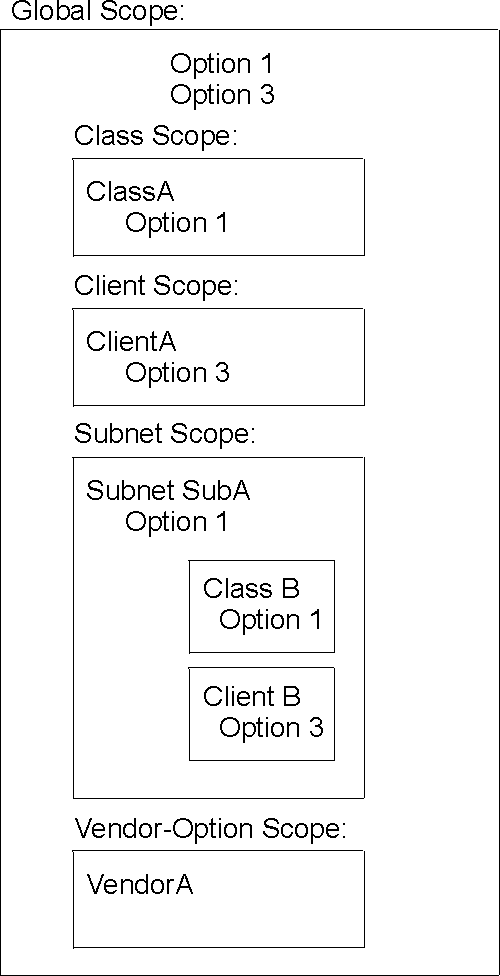
- Scope
- The term scope, when discussing the DHCP server Configuration, will be
used to identify what a certain parameter value pertains to. Figure 49 illustrates the following scopes:
- Global option 1
- Global option 3
- Global class ClassA
ClassA has redefined option 1, but will inherit the value of option 3 from
the global scope.
- Global client ClientA
ClientA has redefined option 3, but will inherit the value of option 1 from
the global scope.
- subnet SubA
- Redefines Option 1.
- Inherits the value of Option 3 from the global scope.
- Defines ClassB within the scope of SubA.
It redefines the value of option 1, but will inherit the value of option 3
from SubA (which also happens to be inherited from the global
scope).
- Defines ClientB within the scope of SubA.
ClientB has redefined option 3, but will inherit the value of option 1 from
SubA.
- vendor-option vendorA
Vendor-options are an exception. Vendor-options are independent and
are not inherited outside of the vendor-option scope.
Figure 49. Scope Concepts
- Subnet
- A subnet defines the parameters for an address pool administered by a DHCP
server. An address pool is a range of IP addresses to be leased to
clients. Parameters that can be specified include the lease time and
other options for clients using the address pool. The lease time and
other options can be inherited from the global scope.
- Subnet Groups
- A subnet group is a way to identify multiple subnets that are to be
grouped together on the same interface. All the subnets in a given
group are given the same subnet group name and a unique priority. The
priority is used to determine the order addresses are given out according to
the address policy the group is associated with. A subnet can belong to
one of two address policies:
- Inorder
This policy is the default. The inorder policy administers addresses
starting with the subnet with the lowest priority and ending with the subnet
with the highest priority.
- Balance
The balance policy administers addresses from the group of defined subnets
in a round-robin order. The first address is administered from the
subnet with the lowest priority. The second address is administered
from the subnet with the next lowest priority, and so on. When an
address from the highest priority subnet has been administered, the policy
returns to the subnet with the lowest priority until all addresses are
exhausted from all the subnets in the group.
- Classes
- A class defines the parameters for a user defined group of clients,
administered by the DHCP server. Classes can be defined under the
global or a subnet scope. When a class is defined within a subnet
scope, the DHCP server will only serve clients in the class that are both
located in the specified subnet and request the class. Only classes
that are defined within a subnet's scope can specify a range of
addresses. The range can be either a subset of the subnet range or can
be equal to the subnet range. A client that requests an IP address from
a class which has exhausted its range is offered an IP address from the subnet
range, if available. The client is offered the options associated with
the exhausted class.
- Clients
- A client can be used to:
- Define a static IP address and DHCP options for a specific end station
- Exclude a specific endstation from service
- Exclude an IP address from a range of available IP addresses
Each client has a specified hardware type, client id and IP
address. The hardware types are defined in RFC 1340 and are shown
below. For all hardware types besides 0, the client ID is the hardware
address of the endstation (or MAC address). For hardware type of 0, the
client id is a character string. Typically, this would be a domain
name.
When defining a client, you are prompted for either an IP address,
any or none. If you define an IP address, that IP
address is reserved for that client. If you choose any, then
that client will be given any available IP address within that subnet.
If you have several subnets records defined within the same subnet, each
having a unique range, then a client that is configured with any
will get the first available address within the subnet, not necessarily from
the range of the specific subnet record that the client is defined
under. If you choose none, then that end station will not be
served any IP address at all. To exclude an IP address from being
administered, you would define a client record with a hardware type and client
id of 0.
Hardware types that are defined by RFC1340 and that pertain to the IBM 2212
are:
Hardware Type                               Value
-------------                               -----
Reserved                                    0
Ethernet                                    1
IEEE 802 Networks (including Token Ring)    6
For the complete list, refer to RFC 1340.
The following DHCP server parameters can be defined at the global
level:
- bootstrapserver
- canonical
- lease expire interval
- lease time default
- ping time
- support unlisted clients
- support bootp
- used ip address expire interval
See "Set" for a description of these parameters.
DHCP allows you to specify options to provide
additional configuration information to a client. The options are
defined in RFC 2132 and various other RFCs.
All options expect the configuration data to be in
one of the following formats:
- Format
- Definition
- IP address
- A single IP address in dotted-decimal notation.
- IP addresses
- One or more IP addresses in dotted-decimal notation, separated by
blanks.
- IP address pair
- Two IP addresses in dotted-decimal notation, separated by blanks.
- IP address pairs
- One or more IP address pairs, each pair separated from another by a
blank.
- Boolean
- 0 or 1 (True or False).
- Byte
- A decimal number between -128 and 127 (inclusive).
- Unsigned byte
- A decimal number between 0 and 255 (inclusive). You cannot specify
a negative value for an unsigned byte.
- List of unsigned bytes
- One or more decimal numbers between 0 and 255 (inclusive) separated by
blanks. You cannot specify a negative number for an unsigned
byte.
- Short
- A decimal number between -32768 and 32767 (inclusive).
- Unsigned short
- A decimal number between 0 and 65535 (inclusive). You cannot
specify a negative number for an unsigned short.
- List of unsigned shorts
- One or more decimal numbers between 0 and 65535 (inclusive) separated by
blanks. You cannot specify a negative number for an unsigned
short.
- Long
- A decimal value between -2147483648 and 2147483647 (inclusive).
- Unsigned long
- A decimal number between 0 and 4294967295 (inclusive). You cannot
specify a negative number for an unsigned long.
- String
- A string of characters.
- N/A
- Indicates no specification is needed because the client generates this
information.
Each DHCP option is identified by a numeric code.
Architected options 0 through 127 and option 255 are reserved for
definitions by RFCs. The DHCP server, the DHCP client, or both server
and client use options in this set. Some architected options can be
modified by the administrator. Other options are for exclusive use by
the client and server.
| Note: | Hexadecimal values are not allowed for architected options with known
formats.
|
Options that the administrator cannot or should not configure at the DHCP
server include:
- 52
- Option Overload
- 53
- DHCP message type
- 54
- Server identifier
- 55
- Parameter request list
- 56
- Message
- 57
- Maximum DHCP message size
- 60
- Class identifier
Options 128 through 254 represent user-defined options that can be defined
by administrators to pass information to the DHCP client to implement
site-specific configuration parameters.
Additionally, IBM provides a set of IBM-specific options such as option
192: TXT RR
The format of a user-defined option is:
Syntax:
- option
- code value
where,
- code
- Any option code from 1 through 254, except codes that are already defined
in a RFC.
- value
- Must always be a string. At the server, it can be an ASCII string
or a hexadecimal string. At the client, however, it always appears as a
hexadecimal string as passed to the processing program.
The server passes the specified value to the client. However, a
program or command file must be created to process the value.
The following base options are provided to the client. See "Option Formats" for a description of the configuration format.
- 1
- Subnet Mask This option is specified only at the DHCP
server. The client's subnet mask, specified in a 32-bit
dotted-decimal notation. Although not required, in most configurations
the DHCP server should send option 1, subnet mask, to the DHCP clients.
Client operation may be unpredictable if the client receives no subnet mask
from the DHCP server and assumes a subnet mask that is not appropriate of the
subnet. If not specified, the client used the default subnet
masks:
- Class A network 255.0.0.0
- Class B network 255.255.0.0
- Class C network 255.255.255.0
Option format: IP addresses
- 2
- Time Offset This options is specified only at the DHCP
server. The offset (in seconds) of the client's subnet from
Coordinated Universal Time (CUT). The offset is a signed 32-bit
integer.
Option format: Long
- 3
- Router This option is specified only at the DHCP server.
IP addresses (in order of preference) of the routers on the client's
subnet.
Option format: IP addresses
- 4
- Time Server This option is specified only at the DHCP
server. IP addresses (in order of preference) of the time servers
available to the client.
Option format: IP addresses
- 5
- Name Server This option is specified only at the DHCP
server. IP addresses (in order of preference) of the IEN 116 name
servers available to the client.
| Note: | This is not the Domain Name Server option. Use Option 6 to specify a
Domain name server.
|
Option format: IP addresses
- 6
- Domain Name Server This option is specified only at the DHCP
server. IP addresses (in order of preference) of the Domain Name System
servers available to the client.
Option format: IP addresses or un-numbered IP interfaceaddress (for
example, 0.0.0.2)
| Note: | If dynamic-address is enabled in the IP configuration for a PPP interface,
you may be able to retrieve a Primary and Secondary DNS address using IPCP
from an Internet Service Provider (ISP). To pass these DNS addresses
along to the DHCP clients, you must configure option 6 with an un-numbered IP
interface address (such as 0.0.0.n) that corresponds to
the Dynamic-Address interface. The DHCP server will convert this to the
value retrieved from the ISP when the client sends a request. Enabling
Simple-Internet-Access in the IP configuration will configure option 6 with
the un-numbered IP interface automatically. Any client requesting its
configuration information from this Server prior to the PPP interface
activating, will be offered a shortened lease time (3 minutes) to allow time
for the PPP connection and IPCP to complete. After the DNS addresses
are learned, configured lease times will be offered.
|
- 7
- Log Server This option is specified only at the DHCP
server. IP addresses (in order of preference) of the MIT-LCS UDP Log
servers available to the client.
Option format: IP addresses
- 8
- Cookie Server This option is specified only at the DHCP
server. IP addresses (in order of preference) of the Cookie, or
quote-of -the-day servers available to the client.
Option format: IP addresses
- 9
- LPR Server This option can be specified at both the DHCP client
and DHCP server. However, if specified only at the DHCP client, the
configuration will be incomplete. IP addresses (in order of preference)
of the line printer servers available to the client. Option 9
eliminates the need for clients to specify the LPR_SERVER environment
variable.
Option format: IP addresses
- 10
- Impress Server This option is specified only at the DHCP
server. IP addresses (in order of preference) of the Imagen Impress
servers available to the client.
Option format: IP addresses
- 11
- Resource Location Server This option is specified only at the
DHCP server. IP addresses (in order of preference) of the Resource
Location (RLP) servers available to the client. RLP servers allow
clients to locate resources that provide a specified service, such as a domain
name server.
Option format: IP addresses
- 12
- Host Name This option can be specified at both the DHCP client
and the DHCP server. If the DHCP client does not provide a host name,
the DHCP server ignores option 12. Host name of the client (which may
include the local domain name). The minimum length for the host name
option is 1 octet and the maximum is 32 characters. See RFC 1035 for
character set restrictions.
Option format: String
- 13
- Boot File Size This option is specified only at the DHCP
server. The length (in 512-octet blocks) of the default boot
configuration file for the client.
Option format: Unsigned short
- 14
- Merit Dump File This option is specified only at the DHCP
server. The path name of the merit dump file in which the client's
core image is stored if the client crashes. The path is formatted as a
character string consisting of characters from the Network Virtual Terminal
(NVT) ASCII character set. The minimum length is 1 octet.
Option format: String
- 15
- Domain Name This option is specified at both the DHCP client
and the DHCP server. If no value is specified at the DHCP server in
option 15, the client is required to provide a value for option 12, host name,
and option 15, domain name. This statement may appear within the global
scope, or with a Subnet, Class or Client scope.
Option format: String
- 16
- Swap Server This option is specified only at the DHCP
server. The IP address of the client's swap server.
Option format: IP address
- 17
- Root Path This option is specified only at the DHCP
server. The path that contains the client's root disk. The
path is formatted as a character string consisting of characters from the NVT
ASCII character set. The minimum length is 1 octet.
Option format: String
- 18
- Extension Path This option is specified only at the DHCP
server. The extension path option specifies a string that can be used
to identify a file that is retrievable using the Trivial File Transfer
Protocol (TFTP). The minimum length is 1 octet.
Option format: String
- 19
- IP Forwarding This option is specified only at the DHCP
server. Enable (1) or disable (0) forwarding by the client of its IP
layer packets.
Option format: Boolean
- 20
- Non-Local Source Routing This option is specified only at the
DHCP server. Enable (1) or disable (0) forwarding by the client of its
IP layer data grams with non-local source routes.
Option format: Boolean
- 21
- Policy Filter This option is specified only at the DHCP
server. IP address-net mask pair used to filter data grams with
non-local source routes. Any data gram whose next hop address does not
match one of the filter pairs is discarded by the client. The minimum
length for the policy filter option is 8 octets.
Option format: IP address pairs
- 22
- Maximum Data gram Reassembly Size This option is specified only
at the DHCP server. Maximum size data gram the client will
reassemble. The minimum value is 576.
Option format: Unsigned short
- 23
- Default IP Time-to-Live This option is specified only at the
DHCP server. Default time-to-live (TTL) the client uses on outgoing
data grams. TTL is an octet with a value between 1 and 255.
Option format: Unsigned byte
- 24
- Path MTU Aging Timeout This option is specified only at the
DHCP server. Timeout in seconds used to age Path Maximum Transmission
Unit (MTU) values discovered by the mechanism that is described in RFC
1191.
Option format: Unsigned long
- 25
- Path MTU Plateau Table This option is specified only at the
DHCP server. Table of MTU sizes to sue in Path MTU discover as defined
in RFC 1191. The minimum MTU value is 68. The minimum length for
the path MTU plateau table option is 2 octets. The length must be a
multiple of 2.
Option format: Unsigned short
- 26
- Interface MTU This option is specified only at the DHCP
server. Maximum Transmission Unit (MTU) to sue on this
interface. The minimum MTU value is 68.
Option format: Unsigned short
- 27
- All Subnets are Local This option is specified only at the DHCP
server. Client assumes (1) or does not assume (0) all subnets use the
same Maximum Transmission Unit (MTU). A value of 0 means the client
assumes some subnets have smaller MTUs.
Option format: Boolean
- 28
- Broadcast Address This option is specified only at the DHCP
server. Broadcast address used on the client's subnet.
Option format: IP address
- 29
- Perform Mask Discovery This option is specified only at the
DHCP server. Clients performs (1) or does not perform (0) subnet mask
discovery using Internet Control Message Protocol (ICMP).
Option format: Boolean
- 30
- Mask Supplier This option is specified only at the DHCP
server. Client responds (1) or does not respond (0) to subnet mask
requests using Internet Control Message Protocol (ICMP).
Option format: Boolean
- 31
- Perform Router Discovery This option is specified only at the
DHCP server. Client solicits (1) or does not solicit (0) routers using
router discovery as defined in RFC 1256.
Option format: Boolean
- 32
- Router Solicitation Address This option is specified only at
the DHCP server. Address to which a client transmits router
solicitation requests.
Option format: IP address
- 33
- Static Route This option is specified only at the DHCP
server. Static routes (designation address-router pairs in order of
preference) the client installs in its routing cache. The first address
is the destination address and the second address is the router for the
destination. Do not specify 0.0.0.0 as a default
route destination.
Option format: IP address pairs
- 34
- Trailer Encapsulation This option is specified only at the DHCP
server. Client negotiates (1) or does not negotiate (0) the use of
trailers when using Address Resolution Protocol (ARP). For more
information see RFC 893.
Option format: Boolean
- 35
- ARP Cache Timeout This option is specified only at the DHCP
server. Timeout in seconds for Address Resolution Protocol (ARP) cache
entries.
Option format: Unsigned long
- 36
- Ethernet Encapsulation This option is specified only at the
DHCP server. For an Ethernet interface, client uses IEEE 802.3
(1) Ethernet encapsulation described in RFC 1042 or Ethernet V2 (0)
encapsulation described in RFC 894.
Option format: Boolean
- 37
- TCP Default TTL This option is specified only at the DHCP
server. Default time-to-live (TTL) the client uses for sending TCP
segments.
Option format: Unsigned byte
- 38
- TCP Keep-alive Interval This option is specified only at the
DHCP server. Interval in seconds the client waits before sending a
keep-alive message on a TCP connection. A value of 0 indicates the
client does not send keep-alive messages unless requested by the
application.
Option format: Unsigned long
- 39
- TCP Keep-alive Garbage This option is specified only at the
DHCP server. Client sends (1) or does not send (0) TCP keep-alive
messages that contain an octet of garbage for compatibility with previous
implementations.
Option format: Boolean
- 40
- Network Information Service Domain This option is specified
only at the DHCP server. The client's Network Information Service
(NIS) domain. The domain is formatted as a character string consisting
of characters from the NVT ASCII character set. The minimum length is 1
octet.
Option format: String
- 41
- Network Information Service Domain This option is specified
only at the DHCP server. IP addresses (in order of preference) of
Network Information Service (NIS) servers available to the client.
Option format: IP addresses
- 42
- Network Time Protocol Servers This option is specified only at
the DHCP server. IP addresses (in order of preference) of Network Time
Protocol (NTP) servers available to the client.
Option format: IP addresses
- 43
- Vendor-Specific Information Option 43 is specified only at the
DHCP server, which returns this option to a client that sends option 60, Class
Identifier. This information option is used by clients and servers to
exchange vendor-specific information, which is specified in the vendor-option
definition. Considerations in using Option 43 to encapsulate vendor
information are:
- To permit interoperability between clients and servers from different
vendors, each vendor must clearly document its option 43 content using the
standard format from RFC 2132.
- Each vendor should specify the specific options that can be encapsulated
within option 43 in a form that DHCP servers from another vendor can easily
implement. For example, the vendor should:
- Represent those options either in a data types already defined for DHCP
options or in other well-defined data types.
- Choose options that can be readily encoded in configuration files for
exchange with servers provided by other vendors.
- Be readily supportable by all servers.
Servers that cannot interpret the vendor-specific information sent by a
client must ignore it. Clients that do not receive desired
vendor-specific information should attempt to operate without it. Refer
to RFC 2131 and RFC 2132 for additional information about this option.
| Note: | Because of these considerations, IBM instead uses options 192 and 200 for
IBM-specific options.
|
Option format: String
- 44
- NetBIOS over TCP/IP Name Server This option is specified only
at the DHCP server. IP addresses (in order of preference) of NetBIOS
name servers (NBNS) available to the client.
Option format: IP addresses
- 45
- NetBIOS over TCP/IP Datagram Distribution Server This option is
specified only at the DHCP server. IP addresses (in order of
preference) of NetBIOS data gram distribution (NBDD) name servers available to
the client.
Option format: IP addresses
- 46
- NetBIOS over TCP/IP Node Type This option is specified only at
the DHCP server. Node type used for NetBIOS over TCP/IP configurable
clients as described in RFC 1001 and RFC 1002. Values to specify client
types include:
- 0x1 B-node
- 0x2 P-node
- 0x4 M-note
- 0x8 H-node
Option format: Unsigned byte
- 47
- NetBIOS over TCP/IP Scope This option is specified only at the
DHCP server. NetBIOS over TCP/IP scope parameter for the client, as
specified in RFC 1001/1002. The minimum length is 1 octet.
Option format: Unsigned byte
- 48
- X Window System Font Server This option is specified only at
the DHCP server. IP addresses (in order of preference) of X Window
System font servers available to the client.
Option format: IP addresses
- 49
- Window System Display Manager This option is specified only at
the DHCP server. IP addresses (in order of preference) of systems
running X Window System Display Manager available to the client.
Option format: IP addresses
- 50
- Requested IP Address This option is specified only at the DHCP
client. The DHCP server can refuse a DHCP client request for a specific
IP address. Allows the client to request (DHCPDISCOVER) a particular IP
address.
Option format: N/A
- 51
- IP Address Lease Time This option can be specified at both the
DHCP client and the DHCP server. The DHCP client can use option 51 to
override the defaultLeaseInterval value the DHCP server offers. Allows
the client to request (DHCPDISCOVER or DHCPREQUEST) a lease time for an IP
address. In a reply (DHCPOFFER), a DHCP server uses the option to offer
a lease time. This option may be specified within the global, subnet,
class or client scope. Use X'ffffffff' to indicate an infinite
(permanent) lease.
Option format: Unsigned long
- 58
- Renewal (T1) Time Value This option is specified only at the
DHCP server. Interval in seconds between the time the server assigns an
address and the time the client transitions to the renewing state.
Option format: Unsigned long
- 59
- Rebinding (T2) Time Value This option is specified only at the
DHCP server. Interval in seconds between the time the server assigns an
address and the time the clients enters the rebinding state.
Option format: Unsigned long
- 60
- Class-Identifier This option is specified only at the DHCP
client. This information is generated by the client and does not have
to be specified. Type and configuration of the client, supplied by the
client to the server. For example, the identifier may encode the
client's vendor-specific hardware configuration. The information
is a string of n octets, interpreted by servers. For
example: hex: X'01' X'02' X'03'.
Servers not equipped to interpret the class-specific information sent by a
client must ignore it. The minimum length is 1 octet.
Option format: N/A
- 61
- Client Identifier This option can be specified at both the DHCP
client and the DHCP server. The DHCP client can use option 61 to
specify the unique client identifier. The DHCP server can use option 61
to index the database of address bindings. This value is expected to be
unique for all clients in an administrative domain.
Option format: String
- 62
- NetWare/IP Domain Name This option is specified only at the
DHCP server. Netware/IP Domain Name. The minimum length is 1
octet and the maximum length is 255
Option format: String
- 63
- NetWare/IP This option is specified only at the DHCP
server. A general purpose option code used to convey all the NetWare/IP
related information except for the NetWare/IP domain name. A number of
NetWare/IP sub-options will be conveyed using the option code. The
minimum length is 1 and the maximum length is 255.
Option format: String
- 64
- NIS domain Name This option is specified only at the DHCP
server. Network Information Service (NIS)+ V3 client domain
name. The domain is formatted as a character string consisting of
characters from the NVT ASCII character set. Its minimum length is
1.
Option format: String
- 65
- NIS Servers This option is specified only at the DHCP
server. IP addresses (in order of preference) of Network Information
Service (NIS+ V3 servers available to the client.
Option format: IP addresses
- 66
- Server Name This option is specified only at the DHCP
server. Trivial File Transfer Protocol (TFTP) server name used when the
"sname" field in the DHCP header has been used for DHCP options.
Option format: String
- 67
- Boot File Name This option is specified only at the DHCP
server. Name of the boot file when the file field in the DHCP header
has been used for the DHCP options. The minimum length is 1.
| Note: | Use this option to pass a boot file name to a DHCP client. The boot
file name is required to contain the fully-qualified path name and be less
than 128 characters in length. For example: option 67
c:\path\boot_file_name. This file contains information that can
be interpreted in the same way as the 64-octet vendor-extension field within
the BOOTP response, with the exception that the file length is limited to 128
characters by the BootP header.
|
Option format: String
- 68
- Home Address This option is specified only at the DHCP
server. IP addresses (in order of preference) of the mobile IP home
agents available to the client. The option enables a mobile host to
derive a Mobile home address, and determine the subnet mask for the home
network. The usual length will be four octets, containing a single home
agent's home address, but the length can be zero. A zero length
indicates that no home agents are available.
Option format: IP addresses
- 69
- SMTP Servers This option is specified only at the DHCP
server. IP addresses (in order of preference) of the Simple Mail
Transfer Protocol (SMTP) servers available to the client.
Option format: IP addresses
- 70
- POP3 Server This option is specified only at the DHCP
server. IP addresses (in order of preference) of the Post Office
Protocol (POP) servers available to the client.
Option format: IP addresses
- 71
- NNTP Server This option is specified only at the DHCP
server. IP addresses (in order of preference) of the Network News
Transfer Protocol (NNTP) servers available to the client.
Option format: IP addresses
- 72
- WWW Server This option is specified only at the DHCP
server. IP addresses (in order of preference) of the World Wide Web
(WWW) servers available to the client.
Option format: IP addresses
- 73
- Finger Server This option is specified only at the DHCP
server. IP addresses (in order of preference) of the Finger servers
available to the client.
Option format: IP addresses
- 74
- IRC Server This option is specified only at the DHCP
server. IP addresses (in order of preference) of the Internet Relay
Chat (IRC) servers available to the client.
Option format: IP addresses
- 75
- StreetTalk Server This option is specified only at the DHCP
server. IP addresses (in order of preference) of the StreetTalk servers
available to the client.
Option format: IP addresses
- 76
- STDA Server This option is specified only at the DHCP
server. IP addresses (in order of preference) of the StreetTalk
Directory Assistance (STDA) servers available to the client.
Option format: IP addresses
- 77
- User Class This option is specified only at the DHCP
client. DHCP clients use option 77 to indicate to DHCP servers what
class the host is a member of. The user class must be manually entered
in the \DHCPCD.CFG file as the value for option 77 in order to receive
parameters defined for the class at a DHCP server. The
DHCPCD.CFG file is located in the ONDEMAND\SERVER\ETC directory.
Option format: String
- 78
- Directory Agent This option is specified only at the DHCP
server. The Dynamic Host Configuration Protocol provides a framework
for passing configuration information to hosts on a TCP/IP network.
Entities using the Service Location Protocol need to find out the address of
Directory Agents in order to transact messages. In certain other
instances they may need to discover the correct scope and naming authority to
be used in conjunction with the service attributes and URLs which are
exchanged using the Service Location Protocol. A directory agent has a
particular scope, and may have knowledge about schemes defined by a particular
name authority.
Option format: IP address
- 79
- Service Scope This option is specified only at the DHCP
server. This extension indicates a scope that should be used by a
service agent, when responding to Service Request messages as specified by the
Service Location Protocol.
Option format: String
- 80
- Naming Authority This option is specified only at the DHCP
server. This extension indicates a naming authority, which specifies
the syntax for schemes that may be used in URLs for use by entities with the
Service Location Protocol.
Option format: String
IBM provides a set of IBM-specific options by defining options within the
user-defined range (128-254). These options are used instead of
defining a vendor option (option 43) for IBM. It is recommended that
you do not redefine these options.
- 192
- TXT RR If this option is specified at the DHCP server, the DHCP
client user is required to complete the system administrator information
fields. Note: This option is only supported by TCP/IP Version
4.1 for OS/2 clients. This option provides up to four required
text labels or entry fields the system administrator can specify, such as the
name of a user, the user's phone number, or other fields that the DDNS
Client configuration program prompt the user for. These fields allow
the system administrator to identify the actual person who configured the host
name or other data. The DDNS configuration program does not display
these fields unless the system administrator specifies them. This
information is stored in a text record in the DNS. The pairs of field
labels and data are required to fit within a single TXT resource
record. The space available is divided evenly between the pairs.
The value is also updated in file DDNSCLI.CFG on the Dynamic-Address
client.
Option format: String
The DHCP protocol provides a way to supply vendor-specific information to a
DHCP client using RFC-architected options 43 and 60.
- 60
- Option 60 is configured at a DHCP client and sent to the DHCP
server to identify the client as one from a specific vendor.
- 43
- Option 43 is configured at the DHCP server to define the
vendor-specific information to be returned to the client in response to the
client's option 60 request. For the Common Code DHCP server,
option 43 is configured using the add vendor-option command. A
vendor-option is only defined within the global scope. The vendor
option consists of the name of the vendor and the option data. The
option data has two formats:
- Hex data
- This is entered with the vendor name when the add vendor-option command is
issued. The hex data must be entered as a hex string with blanks
between the bytes: "01 AA 55"
- Options
- Any DHCP option can be added to a vendor-option scope by the add option
command.
| Note: | Hex data and options are mutually exclusive in a vendor definition.
You can define one or the other, but not both.
|
In order for the DHCP server to successfully assign IP addresses and
configuration information for clients on an added subnet, IP may have to be
configured appropriately. This is necessary when the DHCP server is
directly connected to a subnet that it is configured to support.
If a BOOTP relay agent is being used to forward DHCP request messages to
this DHCP server, there may not be any required IP configuration to support a
subnet that is not directly connected to the server.
An IP address which falls within the DHCP configured subnet will need to be
added to the connecting interface.
Example:
- DHCP has added a subnet as follows:
DHCP Server config>list subnet all
subnet      subnet           subnet           starting         ending
name        address          mask             IP Addr          IP Addr
-------------------------------------------------------------------------
net-one     192.168.8.0      255.255.255.0    192.168.8.2      192.168.8.50
- IP will require the following:
IP config>add address
Which net is this address for [0]? 0
New address []? 192.168.8.1
Address mask [255.255.255.0]?

IP config>list add
IP addresses for each interface:
intf     0   192.168.8.1      255.255.255.0    Local wire broadcast, fill 1
intf     1                                     IP disabled on this interface
intf     2   0.0.0.2          255.255.255.255  Local wire broadcast, fill 1
intf     3                                     IP disabled on this interface
If Simple-Internet-Access is enabled in IP and DHCP has not previously
been configured, the following configuration will be automatically generated
in the DHCP server. Simple-Internet-Access will also automatically
configure the NAT feature and other IP filters and access controls. If
DHCP is already configured there will be no changes/additions to the DHCP
configuration. Refer to Using
Simple Internet Access in the "Using IP" chapter in Protocol Configuration and Monitoring Reference Volume 1 for more information and restrictions.
- IP has been configured as follows:
IP config>enable simple-internet-access
Interface to Service Provider [0]? 3
SIMPLE-INTERNET-ACCESS enabled on interface 3

IP config>add address
Which net is this address for [0]? 0
New address []? 192.168.8.1
Address mask [255.255.255.0]?

IP config>list add
IP addresses for each interface:
intf     0   192.168.8.1      255.255.255.0    Local wire broadcast, fill 1
intf     1                                     IP disabled on this interface
intf     2                                     IP disabled on this interface
intf     3   0.0.0.3          255.255.255.255  Local wire broadcast, fill 1
                                               SIMPLE-INTERNET-ACCESS Enabled
- DHCP server will have the following configuration generated:
DHCP Server config> list global
.
.
DHCP Server enabled: Yes
.
.
DHCP Server config>list subnet all
subnet      subnet           subnet           starting         ending
name        address          mask             IP Addr          IP Addr
-------------------------------------------------------------------------
simple-net  192.168.8.0      255.255.255.0    192.168.8.2      192.168.8.50

DHCP Server config>list option subnet
Enter the subnet name []? simple-net
option  option
code    data
---------------------------------------------------------------
 1      255.255.255.0
 3       192.168.8.1
 6       0.0.0.3
This section provides a typical DHCP server configuration in an ASCII
text format. This example is strictly for the purpose of illustration,
to show a configuration in a format that may be familiar to you. The
IBM 2212 does not support ASCII configurations.
You can use the blocked numbers ((1)) to relate the functions
described in this ASCII example to the equivalent talk 6
configuration shown in "OPCON (Talk 6) Configuration".
(1) Configuration of Server parameters

leaseTimeDefault          120                  # 120 minutes
leaseExpireInterval       20 seconds
supportBOOTP              yes
supportUnlistedClients  yes


(2) Global options.  Passed to every client unless overridden at a lower scope.

option 15       "raleigh.ibm.com"         # domain name
option 6         9.67.1.5                         # dns server

class manager
{
  option 48   6.5.4.3
  option 9    9.37.35.146
  option 210  "manager_authority"   # site specific option given to all managers
}

(3) Vendor-options


vendor  XI-clients hex"01 02 03"

vendor XA-clients
{
   option 23 100   # IP TTL
}

(4) A typical subnet

subnet  9.2.23.0  255.255.255.0        9.2.23.120-9.2.23.126
{
        option 28       9.2.23.127         # broadcast address
        option 9   5.6.7.8
        option 51  200

(5) class manager defined at the subnet scope.  Option 9 here will override
the option 9 specified in the global manager class.
                 class manager

        {
                option 9   9.2.23.98
        }
(6) Programmers have their own subnet range

        class developers  9.2.23.125-9.2.23.126
        {
                option 51       -1                # infinite lease.
                option 9        9.37.35.1         # printer used by the developers
        }
}

(7) Example of a client that will accept any address but will have
its own set of options.

client 6        0x10005aa4b9ab  ANY
{
        option 51 999
        option 1 255.255.255.0
}

(8) Exclude an address from service.

client 0       0               9.2.23.121
The following is an example of the same
configuration using talk 6.
(1) Configuration of Server parameters

Config>f dhcp-server
DHCP server user configuration
DHCP Server config> enable dhcp
DHCP Server config>

DHCP Server config> set lease-time-default hours 2
DHCP Server config>set lease-expire-interval seconds 20
DHCP Server config>set support-bootp yes
DHCP Server config>set support-unlisted-clients global yes

DHCP Server config>li glob
DHCP server Global Parameters
=============================

DHCP server enabled: Yes

Balance:  No subnet groups defined

Inorder:  No subnet groups defined

Canonical: No

Lease Expire Interval:  20 second(s)
Lease Time Default:     2 hour(s)


Support BOOTP Clients: Yes
Bootstrap Server: Not configured

Support Unlisted Clients: Yes

Ping Time:  1 second(s)
Used IP Address Expire Interval:  15 minute(s)


(2) Global options.  Passed to every client unless overridden at a lower scope.

DHCP Server config>add option global 15 raleigh.ibm.com
DHCP Server config>add option global 6 9.67.1.5

DHCP Server config>li option global
option  option
code    data
---------------------------------------------------------------
15      raleigh.ibm.com
6       9.67.1.5
DHCP Server config>add class global
Enter the class name []? manager
Class record with name manager has been added

DHCP Server config>add option class-global
Enter the class name []? manager
Enter the option code [1]? 48
Enter the option data []? 6.5.4.3

DHCP Server config>add option class-global 9 9.37.35.146
DHCP Server config>add option class-global manager 210 manager_authority

DHCP Server config>li class global manager
class
name
---------------------------------------------------------------
manager

 Number of Options: 3
 option  option
 code    data
 ---------------------------------------------------------------
 48       6.5.4.3
 9        9.37.35.146
 210     manager_authority
(3) Vendor-options

DHCP Server config>add vendor-option XI-client
Enter the vendor hex data []? 01 02 03
Vendor-option record with name XI-client has been added

DHCP Server config> add vendor-option XA-client
Enter the vendor hex data []?
Vendor-option record with name XA-client has been added
DHCP Server config> add option vendor-option XA-client 23 100

DHCP Server config>li vendor-option all
vendor      hex
name        data
---------------------------------------------------------------
XI-client   01 02 03
XA-client
DHCP Server config>li vendor-option det XA-client
vendor      hex
name        data
---------------------------------------------------------------
XA-client

 Number of Options: 1
 option  option
 code    data
 ---------------------------------------------------------------
 23      100
(4) A typical subnet

DHCP Server config>add subnet
Enter the subnet name []? sub1
Enter the IP subnet []? 9.2.23.0
Enter the IP subnet mask [255.255.255.0]?
Enter start of IP address range [9.2.23.1]? 9.2.23.120
Enter end of IP address range [9.2.23.150]? 9.2.23.126
Enter the subnet group name []?
Subnet record with name sub1 has been added
DHCP Server config>
DHCP Server config> add option subnet
Enter the subnet name []? sub1
Enter the option code []? 28
Enter the option data []? 9.2.23.127
DHCP Server config> add option subnet 9 5.6.7.8
DHCP Server config>add option subnet sub1 51 200

DHCP Server config>add class subnet
Enter the subnet name []? sub1
Enter the class name []? manager
Enter start of IP address range []?
Class record with name manager has been added

DHCP Server config>add option class-subnet sub1 manager
Enter the option code [1]? 9
Enter the option data []? 9.2.23.98


(6) Programmers have their own subnet range

DHCP Server config>add class subnet
Enter the subnet name []? sub1
Enter the class name []? developers
Enter start of IP address range []? 9.2.23.125
Enter end of IP address range []? 9.2.23.126
Class record with name developers has been added

DHCP Server config>add option class-subnet sub1 developers 51 -1
DHCP Server config>add option class-subnet sub1 developers 9 9.37.35.1
DHCP Server config>li subnet detailed sub1
subnet      subnet           subnet           starting         ending
name        address          mask             IP Addr          IP Addr
-------------------------------------------------------------------------
sub1        9.2.23.0         255.255.255.0    9.2.23.120       9.2.23.126


 Number of Classes: 2
 class
 name
 ---------------------------------------------------------------
 manager

  Number of Options: 1
  option  option
  code    data
  ---------------------------------------------------------------
  9       9.2.23.98
 developers
  starting IP address: 9.2.23.125
  ending   IP address: 9.2.23.126

  Number of Options: 2
  option  option
  code    data
  ---------------------------------------------------------------
  51      -1
  9       9.37.35.1

 Number of Options: 3
 option  option
 code    data
 ---------------------------------------------------------------
 28      9.2.23.127
 9       5.6.7.8
 51      200
(7) Example of a client that will accept any address but will have its own set of               options.

DHCP Server config>add client global
Enter the client name []? any-addr
Enter the client's hardware type (0 - 21) [1]? 6
Enter the client ID (MAC address or string) []? 10005aa4b9ab
Enter the client's IP address (IP address, any, none) []? any

DHCP Server config>add option client-global any-addr 51 999
DHCP Server config>add option client-global any-addr 1 255.255.255.0

(8) Exclude an address from service.

Enter the client name []? excl-addr
Enter the client's hardware type (0 - 21) [1]? 0
Enter the client ID (MAC address or string) []? 0
Enter the client's IP address (IP address, any, none) []? 9.2.23.121

 DHCP Server config>li cli all
client      client  client                         attached    IP
name        type   identifier                      to subnet   address
------------------------------------------------------------------------------
any-addr    6      10005aa4b9ab                                Any
excl-addr   0      0                                           9.2.23.121


DHCP Server config>li client global any-addr
client      client  client                         IP
name        type   identifier                      address
--------------------------------------------------------------------
any-addr    6      10005aa4b9ab                    Any

 Number of Options: 2
 option  option
 code    data
 ---------------------------------------------------------------
 51      999
 1       255.255.255.0
[ Top of Page | Previous Page | Next Page | Table of Contents | Index ]